
Is there a standard HVAC Google Ads budget?
No. A contractor with a high average ticket, strong booking rate, and a large service area can profitably spend far more than one with thin margins in a small town. A figure that works for one would bankrupt or starve the other.
The budget that makes sense is the one your own numbers support: what a sold job is worth to you, how many leads turn into booked calls and sold jobs, how many jobs you can actually run, and how much demand exists in the area you serve. This guide walks through each of those in order.
The common alternatives are all worse. Copying a competitor's spend assumes their margins, close rate, and capacity match yours. Picking a round number because it feels affordable ignores whether it can buy enough clicks to learn anything. Letting an agency set the number without seeing your job records means the budget is based on their minimum retainer, not your economics.
If you want the account-building side — structure, keywords, negatives, landing pages — that is covered in Google Ads for HVAC contractors. This guide is only about the money: how much, where, when, and how to tell whether it is working.
Start from job economics, not from a monthly number
Every sensible budget starts with one question: how much can you afford to pay to win a sold job? That figure — your target cost per sold job — comes from your own records, not from the ad platform.
To get there you need four numbers, and most contractors already have them in their field service software or accounting:
- Average revenue per job, by job type. Repair, replacement, and maintenance should be separate — they are wildly different.
- Gross margin per job, after equipment, parts, and technician labour.
- The share of that gross profit you are willing to spend acquiring the job. This is a business decision, not a benchmark. Some contractors will spend more on a first job because a customer who joins a maintenance plan is worth more over time; others want every job to pay for itself.
- Your booking rate and close rate: the share of leads that become booked appointments, and the share of booked appointments that become sold, invoiced work.
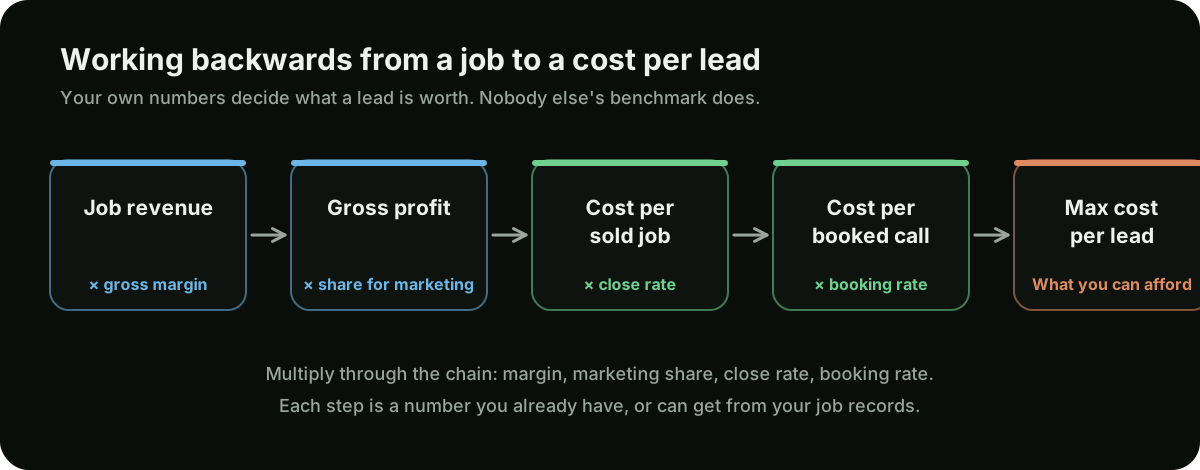
Our cost per lead calculator runs this chain for you. The point is that the ceiling on what a lead is worth is set by your business, and the ad account either beats that ceiling or it does not.
The budget formula chain
Two formulas do most of the work. The first tells you the most you can pay for a lead. The second tells you what the monthly budget should be.
- Maximum cost per lead = target cost per sold job × close rate × booking rate. If you can afford a certain amount per sold job, and only some leads book and only some bookings close, each lead is worth a fraction of that amount.
- Monthly budget = sold jobs wanted × target cost per sold job. The number of jobs should be the number you want and can serve from this channel, not an aspiration.
A third check ties them together: leads needed = monthly budget ÷ maximum cost per lead. If you then multiply leads needed by booking rate and close rate, you should land back on the number of jobs you wanted. If the numbers do not reconcile, one of your inputs is wrong.
| Step | Formula | Illustrative figure |
|---|---|---|
| Target cost per sold job | Gross profit per job × share you will spend on acquisition | $400 |
| Close rate | Sold jobs ÷ booked appointments | 50% |
| Booking rate | Booked appointments ÷ leads | 60% |
| Maximum cost per booked call | Target cost per sold job × close rate | $200 |
| Maximum cost per lead | Maximum cost per booked call × booking rate | $120 |
| Sold jobs wanted per month | What you want and can serve from paid search | 20 |
| Monthly budget | Sold jobs wanted × target cost per sold job | $8,000 |
| Leads needed | Monthly budget ÷ maximum cost per lead | About 67 |
| Reconciliation | Leads × booking rate × close rate | About 20 sold jobs |
Run this separately for each job type you advertise. A replacement job carries a much larger target cost per sold job than a repair call, so its maximum cost per lead is far higher. Blend them and you will either underbid on replacements or overpay for repairs.
Two practical notes. First, improving booking rate or close rate raises your maximum cost per lead without touching the ad account — which is often the cheapest way to make paid search affordable. Second, the formula gives you a ceiling, not a target. Beating it is the goal; hitting it exactly means you are paying everything the job can bear.
The search volume ceiling in your service area
The formula tells you what you can afford. It does not tell you what you can spend. Google Ads can only show your ad when someone searches, and the number of people searching for HVAC services inside your service area in a given week is finite. Past a certain point, extra budget has nowhere to go — or it goes to broader, weaker searches just to get spent.
Two tools show you where that ceiling sits:
- Google Keyword Planner, before launch. Enter your core service keywords and set the location to your actual service area. It returns estimated monthly searches and bid ranges. Treat them as rough — Keyword Planner groups similar terms and rounds heavily — but they tell you whether demand in your area is large or small relative to the budget you calculated.
- Impression share, once running. In the campaign view, add the columns for search impression share, search lost impression share (budget), and search lost impression share (rank). These tell you what share of eligible searches you appeared for, and why you missed the rest.
How to read them together:
| What you see | What it means | What to do |
|---|---|---|
| High lost impression share to budget | Demand exists that your budget is not reaching | Raise budget on that campaign if cost per sold job is under target and you have capacity |
| High lost impression share to rank | You are losing auctions on ad quality or bid | Improve ad relevance and landing pages, or raise bids selectively. More budget will not help |
| Low lost share to both, and budget not fully spent | You have hit the demand ceiling for these keywords and this area | Stop adding budget. Growth now comes from new job types, new areas, or organic |
| Budget fully spent, but on search terms you would not choose | The account is reaching past real demand to spend money | Tighten match types and add negatives before deciding anything about budget |
This is why a budget calculated purely from what you want to earn can be wrong in either direction. In a small market the ceiling may sit below your formula budget, and the honest move is to spend less and invest the difference in HVAC SEO and your Google Business Profile. In a large market the ceiling may be far above it, and the limit becomes your capacity rather than demand.
Minimum viable budget: enough clicks to learn
There is also a floor. A budget that buys a handful of clicks a week cannot tell you anything — one good or bad day swings the result, and automated bidding has too little data to learn from. You end up with a campaign that costs money and produces no decisions.
The check is simple arithmetic:
- Clicks per day = daily budget ÷ average cost per click. Use the Keyword Planner estimate for your area before launch, and your actual average once you have data.
- Leads per week = clicks per week × landing page conversion rate. Again, your own figure once you have one.
- Booked jobs per month = leads per month × booking rate × close rate.
Illustrative: at a placeholder of $25 per click — not a benchmark; substitute your own Keyword Planner estimate — a $100 daily budget buys four clicks a day, or roughly 28 a week. If a tenth of those clicks became leads, that is under three leads a week. Split across four campaigns, each campaign would see well under one lead a week and none of them would ever produce a reliable number.
The conclusion is not "spend more". It is concentrate. If your budget only buys a modest number of clicks, put all of it on one or two campaigns — usually the job type with the best economics in your core area — until those campaigns produce enough conversions to judge. Add campaigns as budget and results justify them.
If even a single concentrated campaign cannot buy enough clicks to learn, paid search is probably not the right channel yet. The money is usually better spent on your Google Business Profile, reviews, and the service pages that will later make paid traffic convert.
Splitting budget by job type
Emergency repair, planned replacement, and maintenance behave so differently that they need separate budgets, not just separate ad groups. Each has its own target cost per sold job, its own demand curve through the year, and its own lag between click and revenue.
| Campaign | How to budget it | What to watch |
|---|---|---|
| Emergency and no-heat / no-cool | First call on budget whenever you can genuinely respond. Funded to capture as much qualifying demand as capacity allows | Answered-call rate and lost impression share to budget during peak weeks |
| Repair and service | Core volume. Budget from repair target cost per sold job, adjusted by season | Cost per booked call and search terms drift into parts and DIY |
| Replacement and installation | Higher allowable cost per lead because the job is worth more. Needs patience — quotes take days or weeks to close | Cost per sold replacement, not cost per lead. Unsold quotes and follow-up |
| Maintenance agreements | Small, steady, and heavier in shoulder seasons | Agreements sold and the repair and replacement work they later generate |
| Brand | Small and defensive. Kept separate so it never flatters the other campaigns | Whether competitors are bidding on your name |
A reasonable starting split is proportional to where your profit comes from and where your capacity is idle, not to where searches are cheapest. If replacements make most of your gross profit but your account spends most of its budget on repair calls because they are cheaper to get, the account is optimising for the wrong thing.
Seasonal allocation: peak weeks and shoulder seasons
A flat monthly budget is almost always wrong for HVAC. Demand rises and falls with the weather, so the useful ceiling on spend rises and falls too. The aim is to move money to where demand and capacity are, month by month.
- Peak heat and peak cold. Emergency and repair demand is at its highest. Fund those campaigns up to what your crews can run, and watch lost impression share to budget daily when the forecast turns. Click costs typically rise with competition, but so does urgency.
- Just before the peak. The first hot or cold weeks produce demand before every competitor has raised budgets. Raising spend ahead of a forecast heat wave or cold snap usually beats reacting after the phones start ringing.
- Shoulder seasons. Emergency demand drops. Shift budget to maintenance agreements, planned replacements, and tune-ups, at lower total spend. This is also when replacement buyers have time to compare quotes.
- Heating and cooling on opposite curves. Separate heating and cooling campaigns let you move budget between them as seasons change without rebuilding anything.
- Do not go fully dark. Pausing everything loses momentum in the account and visibility to competitors, and restarting in the rush costs more than a low steady baseline would have.
A practical way to plan: look back at your own job records by month for the last two or three years. The shape of your call volume is a better guide to how budget should move than any national seasonality chart, because it reflects your climate, your customer base, and your capacity.
Search, Local Services Ads, and Performance Max
Most HVAC contractors deciding a Google budget are really deciding between three products that share the results page. They do different jobs, and the honest answer on each is more nuanced than the platform's own marketing.
| Search campaigns | Local Services Ads | Performance Max | |
|---|---|---|---|
| How you pay | Per click | Per lead, where available in your market and category | Per click and impression across Google's inventory |
| Control | High — keywords, match types, negatives, landing pages, hours, areas | Limited — service categories, area, hours, budget | Low — Google chooses placements, audiences, and much of the targeting |
| Visibility into spend | Search terms report shows what you paid for | Lead-level detail, with a process to dispute unqualified leads | Limited — harder to see which searches and placements produced leads |
| Best used for | The core of the budget: specific job types and areas you choose | Additional lead volume and trust from the verification badge | Testing once search campaigns and conversion tracking are solid |
| Main risk | Wasted spend if negatives and match types are neglected | Lead quality you must review and dispute actively | Spend drifting to low-intent placements, and brand traffic being credited as new demand |
A cautious default for most contractors: put the core of the budget into search campaigns you control, run Local Services Ads alongside if they are available in your area and you are willing to review and dispute leads, and hold Performance Max back until you have clean, booked-job conversion data. If you do test Performance Max, give it its own clearly separate budget, exclude your brand terms, and compare its cost per sold job against search — not its cost per lead, which it can make look good by chasing easy conversions.
Where these fit in the wider picture of referrals, SEO, and other channels is covered in HVAC lead generation.
What not to spend on
The fastest way to make a budget go further is to stop funding things that were never going to produce booked work.
- Broad match on generic terms without negatives. "HVAC" alone attracts job seekers, students, parts buyers, and DIYers.
- Hours nobody answers. If calls after a certain time go to voicemail and you have no after-hours response, do not pay for clicks in those hours.
- Areas you do not want to drive to. Calls from the edge of a radius that you then decline are paid for in full.
- Services you do not offer or do not want. Window units, commercial refrigeration, boilers — if you do not do the work, exclude the searches.
- Research-stage queries. "How long does a furnace last" is a reader, not a buyer. Win those with content on your site instead.
- Display and video placements bundled in by default. Check campaign settings; search campaigns can be opted into the Display Network without anyone meaning to.
- Your own brand at the expense of everything else. A brand campaign is sensible, but it should be a small slice, not the reason the account looks profitable.
- More budget during weeks you are already fully booked. It produces calls you cannot run and reviews you do not want.
Tracking prerequisites before you commit a budget
You cannot set a budget from cost per sold job if you cannot measure cost per sold job. Before spending seriously, make sure these are in place:
- Call tracking with a duration threshold. Most HVAC leads are calls. Calls from ads, and from your site after an ad click, need to be recorded as conversions, and very short calls should not count.
- Form submissions tracked as conversions, and only genuine submissions — not page views or button clicks.
- Lead source recorded in your field service or CRM software, so every booked appointment can be traced to the campaign that produced it.
- Booked jobs and, where possible, revenue passed back to Google Ads as offline conversions. This is what lets you judge — and eventually bid on — cost per sold job instead of cost per lead.
- Answered-call rate monitored. A budget increase that lands on a phone nobody answers is money straight out the door.
The detail of setting these up is in Google Ads for HVAC contractors. The budgeting point is simple: without at least steps one to three, every budget decision is a guess dressed up as a report.
How to read results at 30, 60, and 90 days
New campaigns need time before their numbers mean anything, and different questions become answerable at different points. Judging on cost per sold job in week two leads to bad decisions; waiting six months to check the search terms wastes money.
| Checkpoint | Questions to answer | What not to conclude yet |
|---|---|---|
| 30 days | Is tracking recording calls, forms, and lead sources correctly? Are search terms clean, with negatives added weekly? Are calls being answered? Is budget running out early in the day? | Whether the channel is profitable. Volume is too low and replacement quotes have not closed |
| 60 days | What is cost per lead and booking rate by campaign? Which job types and areas produce booked calls? Where is impression share being lost, and why? | Final cost per sold job on replacement work, which lags |
| 90 days | What is cost per sold job by campaign, against the target you set? Which campaigns deserve more budget, which less, and which should stop? | That a single bad or good month is the new normal — compare against the season |
Compare like with like. A campaign launched in a shoulder season will look very different from the same campaign in peak heat, and neither month is a fair verdict on the other. Where you can, compare against the same period in your own job records.
When to raise or lower the budget
Once tracking reaches booked jobs, budget decisions become rules rather than feelings. Apply them campaign by campaign, not to the account as a whole.
Raise the budget on a campaign when all of these are true:
- Cost per sold job is below your target.
- The campaign is losing meaningful impression share to budget, so demand exists that you are not reaching.
- You have capacity to run the extra jobs without breaking response times.
- Search terms are clean, so extra spend will buy more of the same quality.
Lower the budget, or fix before spending more, when any of these are true:
- Cost per sold job is above target after search terms, landing pages, and phone handling have been reviewed.
- Crews are fully booked and new calls are being turned away or delayed.
- Budget is spending fully but lost impression share to budget is near zero — a sign the campaign has reached past real demand into weaker searches.
- Answered-call rate has dropped, so paid calls are going unanswered.
Change budgets in steps rather than leaps, and give each change time to settle before judging it. Large sudden increases can push automated bidding into less efficient auctions, and it becomes hard to tell whether a change in results came from the budget or from the season.
Finally, revisit the inputs every few months. Your average ticket, margin, booking rate, and close rate all move, and each one changes what you can afford per lead. The budget should follow those numbers — which is the whole point of building it from them in the first place. For how paid search fits into the rest of your marketing, see the HVAC marketing guide, and for how we manage accounts, see Google Ads for home service companies.