
What a builder website has to do
This guide is about websites for companies that build homes — production and custom home builders — not website-builder software.
A builder website has four jobs: present changing inventory accurately, help a buyer narrow from a market to a community to a plan to a specific home, qualify the inquiry before it reaches the sales team, and get that inquiry into human hands the same day. A site that looks excellent and does the first job only is the most common situation we find.
Two properties make this harder than a typical service business website:
- The content has a shelf life. Prices, availability, and completion dates change weekly. A builder site is an operational system, not a brochure, and it needs an owner and a routine.
- The decision is made across devices and months. A buyer browses on a phone, compares on a laptop, returns three times, visits a model, and inquires weeks later. The site has to be useful at every one of those moments, which means shareable URLs, saved favourites, and pages that make sense on a return visit.
How buyers actually move through the site
The path is consistent enough to design around, and it is not the path most builder navigation assumes.
| Step | What the buyer is doing | What the page must provide |
|---|---|---|
| Area | Deciding where to look | Communities by area, with price ranges and school context |
| Community | Comparing two or three | Status, price range, location detail, site plan, available homes |
| Plan or home | Choosing something specific | Full specifications, real photography, price, availability |
| Validation | Checking you are credible | Completed work, process, warranty, team, reviews if real |
| Contact | Deciding to visit or ask | Appointment booking with the community carried through |
Two design consequences. Buyers arrive in the middle of this sequence constantly — from search, a portal, or a shared link — so every page needs enough context to orient someone who did not come through the homepage. And the comparison step is real: buyers hold two or three communities in mind, so comparison tools, consistent specification formats, and favourites are genuinely useful rather than decorative.
The community finder
This is the single most important interface on a production builder's site, and it is usually built as a map, which creates two problems at once.
- Provide a linked list alongside the map. Crawlers follow links, not map pins, and buyers on a phone frequently prefer a list. This one change fixes the most common crawlability failure on builder sites.
- Show the decisive facts in the list. Community name, city, price from, home sizes, and status. A finder that shows only names forces a buyer to open six pages.
- Filter on what buyers actually filter on: area, price, status, single storey, and school district. Not on internal categories.
- Keep filter state shareable where it is indexable, and canonicalised where it is not, so a buyer can send a filtered view to a spouse.
- Handle sold-out communities deliberately. Out of the active finder, into a past-communities list that stays linked. The search side of this is covered in our guide to local SEO for home builders.
- Make it work without a location permission prompt. A finder that shows nothing until a buyer grants geolocation loses the ones who decline.
Community page anatomy
Where the majority of high-intent traffic lands. In rough order down the page:
- Name, city, status, and price from — all visible without scrolling. Status first, because a buyer who cannot tell whether you are selling leaves.
- A real photograph of the community or a completed home, not a rendering, not a stock aerial.
- The booking action, present in the first screen and again at the foot of the page.
- Specification summary: home sizes, bedroom and bathroom ranges, storeys, garage, lot sizes, HOA.
- Available homes, as linked cards with address, price, specifications, and completion date.
- Floor plans offered, linked, with from-prices.
- Site plan and lot availability. Heavily used by serious buyers; worth a zoomable image and a text description of what remains.
- Location detail: schools by name, commute context, retail, and amenity status with honest timing.
- Sales office information: address, hours, how to book, and directions that work from a phone.
- Process and credibility: a short path into how you build, your warranty, and completed work.
The most common omission is amenity honesty. If the pool is planned for next year, say so. Buyers discover it at the model anyway, and discovering it there converts far worse than reading it here.
Floor plan page anatomy
- Plan name, size, bedrooms, baths, garage, storeys, and from-price in text at the top.
- The floor plan itself, zoomable, with a genuine alt description and a downloadable version.
- Photography of the plan as built, clearly labelled by community, with renderings labelled as such.
- Options and elevations: structural choices, exterior styles, and which are available where.
- Communities offering this plan, linked, with the price variation between them explained.
- Available homes using this plan, linked.
- Included features, because buyers comparing builders are comparing what is standard.
- An inquiry action that carries the plan name into the form.
A useful addition most builders skip: a short note on who the plan suits — the layout logic, whether the primary suite is downstairs, how the flex space is typically used. Buyers are trying to imagine living in it, and a paragraph of genuine explanation does more than another rendering.
Quick move-in inventory pages
The highest-urgency inventory on the site, and the most likely to be out of date.
- Address, price, and availability date at the top. A move-in-ready buyer is filtering on exactly those three.
- Honest construction status: complete, under construction with a date, or planned. Never imply a home is finished when it is framed.
- Photography of this home where it exists, with plan photography clearly labelled as a similar home if it does not.
- The selections already made — flooring, cabinets, counters, fixtures. This is the whole appeal of a spec home and is usually missing.
- Any incentive attached, stated accurately, with its conditions.
- Links to the plan and the community it belongs to.
- A clearly marked sold state when it sells, with links to similar available homes, before the page is eventually redirected to its community.
Photography and renderings
Real photography of completed homes is the highest-return investment on a builder website. Buyers are trying to judge construction quality and finish level, and a rendering tells them nothing about either. Renderings are legitimate for homes that do not exist yet, provided they are labelled as renderings — the trust cost of an unlabelled rendering is discovered at the model home, at the worst possible moment.
- Photograph every completed model and a sample of delivered homes. Exteriors, main living spaces, kitchens, primary suites, and the details that differentiate your work.
- Include the unglamorous shots. Framing, insulation, mechanical rooms, and structural details persuade the buyer who is comparing builders on quality rather than finishes.
- Label everything. Which plan, which community, and whether it is a model with upgrades. “Model home shown with optional features” is required honesty and costs nothing.
- Avoid stock interiors entirely. In a category sold on proof of work, borrowed photography signals its absence.
- Write real alt text describing the space, which serves both accessibility and image search.
- Keep video short and purposeful. A walkthrough of a plan is useful; an autoplaying brand film in the hero is a performance cost with little return.
Pricing on the website
The objection to publishing prices is always the same: it varies. It does, and a range handles that.
- From-prices per community and per plan. The minimum viable price signal, and enough for a buyer to self-qualify.
- Actual prices on available homes. These are specific homes; there is no reason to withhold the number.
- Say what the price includes and what typically adds to it — lot premium, options, site conditions.
- Keep it current. A stale from-price is worse than none; it produces an inquiry that dies on the first phone call.
- Handle incentives honestly. If a rate buydown is driving the effective price, explain it rather than burying it.
Sites that hide price entirely behind “contact us for pricing” move the entire qualification burden to the sales team, who then spend their week on conversations that were never going to close.
Forms and progressive qualification
The form is where a builder site most often converts well and serves the sales team badly, or serves the sales team well and converts badly. Progressive qualification resolves it.
- Step one asks the minimum: name, email, phone, and what they are asking about — pre-filled from the page they are on.
- Step two, after submission, asks the useful questions: timeline, financing status, current situation, whether they have visited. Framed as helping prepare for the conversation, which is true.
- Everything is captured either way. If they abandon step two you still have a contactable lead with the community and plan attached.
- Hidden fields carry context: community, plan, available home, page URL, campaign, and click identifier.
- Different forms for different intents. An appointment request, a plan inquiry, and a general question should not be the same form.
- Phone numbers are tappable and prominent on mobile, because many buyers would rather call.
Two details that matter more than they should. The confirmation screen is prime real estate — use it for scheduling, relevant plans, and what happens next, not a bare thank-you. And every form needs spam protection that does not punish real buyers; a honeypot field and server-side validation beat a challenge that a buyer in a car will abandon.
The appointment as the primary conversion
A builder's real conversion is a scheduled visit, because homes are sold at the community. Sites whose primary action is “Contact Us” generate inquiries that require a sales person to chase an appointment; sites whose primary action is “Schedule a Visit” generate the appointment directly. The same traffic, a materially different outcome.
- Make booking the prominent action on community, plan, and inventory pages.
- Show real availability where you can, including weekend slots, since that is when buyers visit.
- Say what the visit involves and how long it takes. The unstated fear is a high-pressure sales process.
- Offer a lower-commitment alternative for buyers who are not ready — a question, a plan packet, an interest list — but visually secondary.
- Confirm and remind. Immediate confirmation with the address, a reminder before the appointment, and an easy reschedule reduces no-shows more than anything else.
- Accommodate walk-ins too. Hours and directions should be easy to find for buyers who will simply turn up.
Mobile behaviour at the community
A specific and very common scenario deserves designing for: a buyer parked outside your model home, on their phone, on cellular data, wanting to know what this community costs and whether anyone is there.
- Sales office hours and phone number reachable in one tap from the community page.
- Directions that open the phone's map app with the actual sales office address, not the community centroid.
- Price and status visible immediately, without expanding anything.
- Available homes usable on a small screen, with the address, price, and status in the card.
- The site plan legible on a phone, which usually means a zoomable image plus a text summary of remaining lots.
- Tolerance for weak signal. Text and critical facts first, galleries lazily loaded after.
Performance on an image-heavy site
Builder sites are among the heaviest local business sites there are, for a legitimate reason: the photography is the product. Performance work here is about serving it well rather than serving less of it.
- Modern formats and correct sizing. Serve appropriately sized images per breakpoint rather than scaling a large original in the browser.
- Explicit width and height on every image. Prevents the layout shift that makes gallery-heavy pages feel broken.
- Eager-load the hero, lazy-load everything below it. A thirty-image gallery should load as it is reached.
- Defer non-critical JavaScript and audit third-party scripts honestly — chat widgets, tag managers, heat maps, and virtual tour embeds accumulate quickly.
- Load virtual tours and interactive plans on interaction, behind a click, rather than on every page load.
- Watch font loading and keep the weights you actually use.
- Test on a mid-range phone on throttled data, not on office wifi on a laptop.
One caution: do not degrade the photography to win a score. A faster site that no longer shows construction quality has traded the thing that sells homes for a number in a report.
Accessibility
Worth doing on its own merits, and builder sites have a few recurring failures:
- Floor plans as images with no text alternative. The specifications must exist as readable text, which also happens to be what makes them findable.
- Map-only community finders with no keyboard-navigable or screen-reader-accessible equivalent. The linked list solves this too.
- Low-contrast text over photography, extremely common in builder heroes.
- Galleries and lightboxes that trap keyboard focus or cannot be closed without a mouse.
- Forms with placeholder text instead of labels, which disappears exactly when a user needs it.
- Autoplaying video with no pause control.
Tracking and the CRM handoff
The website's last job is to hand a well-described inquiry to a human quickly. This is where more builder inquiries are lost than anywhere else on this page.
- Capture the context with the lead: community, plan, available home, page, source, campaign, and click identifier.
- Route by intent. An appointment request for a specific community should reach the person who works that community, not a shared inbox.
- Acknowledge immediately with something genuinely useful: what they asked about, what happens next, and who will contact them.
- Alert the sales team in real time by whatever they actually watch — a text message beats an email nobody opens on a Saturday.
- Measure response time and treat it as a marketing metric. It is the cheapest conversion improvement available to most builders.
- Feed outcomes back so appointments and contracts can be attributed to the pages and channels that produced them.
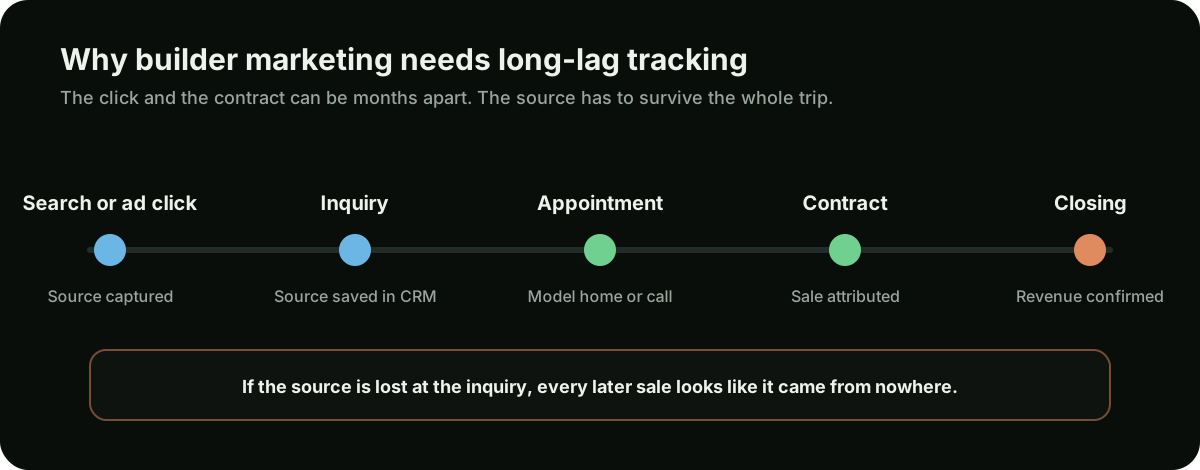
If the sales team is at a model home all weekend, automated first response is not a gimmick — it is the difference between an inquiry that is still warm on Monday and one that has already toured a competitor. Our approach to that is on the lead response automation page.
Once outcomes are tied back to pages and channels, you can make real spending decisions. Our guide to the home builder marketing budget covers how to split money between the website, SEO, and paid search.
Keeping inventory current
A builder site is only as good as its last update. Assign it to someone and give them a routine:
- Weekly: available homes, prices, completion dates, sold homes marked, new releases added.
- Monthly: community statuses, from-prices, incentives, sales office hours, and new photography from recent completions.
- Per release: new plans and lots published, and internal links updated to point at them.
- Per sellout: community converted to sold-out status, removed from the active finder, linked onward to nearby communities, and its paid campaign paused.
- Quarterly: internal links checked, forms tested end to end, page speed re-measured, and old campaign landing pages retired.
Common builder website mistakes
- A map-only community finder. Breaks crawlability and mobile usability in one component.
- “Contact Us” as the primary action. Produces inquiries instead of appointments.
- No price anywhere. Pushes all qualification onto the sales team.
- Forms that lose the community and plan context. The sales team calls back without knowing what the buyer was looking at.
- Unlabelled renderings. Trust is lost at the model home, not on the website.
- Stale inventory. Sold homes still listed and closed communities still shown as selling.
- Floor plans only as images. Invisible to search and to screen readers alike.
- Autoplaying hero video. Slows the page and buries the facts buyers came for.
- Community microsites. Split authority, double the maintenance, orphaned at sellout.
- No process explanation. The one thing first-time new-construction buyers most need.
- Inquiries answered in days. Everything upstream of this is wasted by it.