
Two ways to set the number
Builders usually set a marketing budget one of two ways: as an amount per home sold, or as a percentage of projected revenue. Both are formulas you fill in with your own numbers. Neither has a correct industry value you can borrow, and anyone quoting one to you is quoting someone else's margins, price point, and market.
In practice they are the same number seen from two angles, and it is worth calculating both.
Method one: budget per home sold.
- Marketing budget per home = gross margin per home × share of margin you will spend on acquisition. The share is a business decision. A builder launching a new community might accept a higher share to build early momentum; one closing out a sold-through community might accept much less.
- Annual marketing budget = homes to sell × marketing budget per home. Calculate it per community, then add them up.
Method two: percentage of revenue.
- Annual marketing budget = projected closings × average sale price × chosen percentage.
- Implied percentage = marketing budget per home ÷ average sale price. This is how you convert method one into method two.
Budget per home is usually the better planning tool because it connects directly to inventory. A builder's decisions are community decisions — this one needs traffic, that one is nearly sold out — and a per-home figure lets you fund each community according to where it is in its life. Percentage of revenue is useful as a cross-check, for comparing one year with another, and for conversations with partners who think in those terms.
If the two methods produce very different totals, that is useful information. It usually means either your margin assumptions or your revenue projections need a second look.
Working back from homes to sell
A budget total tells you what you can spend. It does not tell you whether that spend can produce the homes you need. For that, work backward through your own sales funnel, one community at a time.
- Homes to sell in the period — from your release schedule and sales plan.
- Contracts needed = homes to sell ÷ (1 − cancellation rate). Some contracts fall through on financing or buyer circumstances. Use your own history.
- Appointments or tours needed = contracts needed ÷ appointment-to-contract rate. An appointment is a model home visit, a scheduled tour, or a sales consultation — whatever your team treats as a real sales conversation.
- Qualified inquiries needed = appointments needed ÷ inquiry-to-appointment rate. Qualified means someone plausibly able to buy in this community: right price range, right timeframe, right area.
- Maximum cost per qualified inquiry = community marketing budget ÷ qualified inquiries needed.
That last figure is the one that matters for channel decisions. If a channel produces qualified inquiries below that ceiling, it is paying its way. If it produces cheap inquiries that never become appointments, it is not — however good its cost per lead looks.
The conversion rates at each step are yours alone. They depend on your price point, product, sales team, model homes, and market, and they are exactly the numbers most builders are least certain about. If you do not know them, that is the first thing to fix, because every budget decision depends on them.
A budget worksheet for one community
Here is the whole chain for a single community. The figures are deliberately round and purely illustrative — they are not benchmarks, and your numbers will differ. Replace every one.
| Line | Formula | Illustrative figure |
|---|---|---|
| Homes to sell this year | From the release schedule | 24 |
| Marketing budget per home | Gross margin per home × acquisition share | $4,000 |
| Community marketing budget | Homes to sell × budget per home | $96,000 |
| Cancellation rate | Your history | 10% |
| Contracts needed | Homes ÷ (1 − cancellation rate) | About 27 |
| Appointment-to-contract rate | Your history | 20% |
| Appointments or tours needed | Contracts ÷ appointment-to-contract rate | About 135 |
| Inquiry-to-appointment rate | Your history | 30% |
| Qualified inquiries needed | Appointments ÷ inquiry-to-appointment rate | About 450 |
| Maximum cost per qualified inquiry | Budget ÷ qualified inquiries | About $213 |
| Average monthly budget | Budget ÷ 12, before phasing | $8,000 |
Three things the worksheet makes visible. First, small changes in conversion rates move the required inquiry volume enormously — improving inquiry-to-appointment rate through faster follow-up can do more for the budget than any change in ad spend. Second, the monthly average is only a starting point; the community's phase should reshape it. Third, if your channels cannot plausibly produce the required inquiries at or below the ceiling, the plan needs to change before the money is spent, not after.
The cost per lead calculator runs a similar chain if you want to test different inputs quickly.
Why monthly cost per lead misleads builders
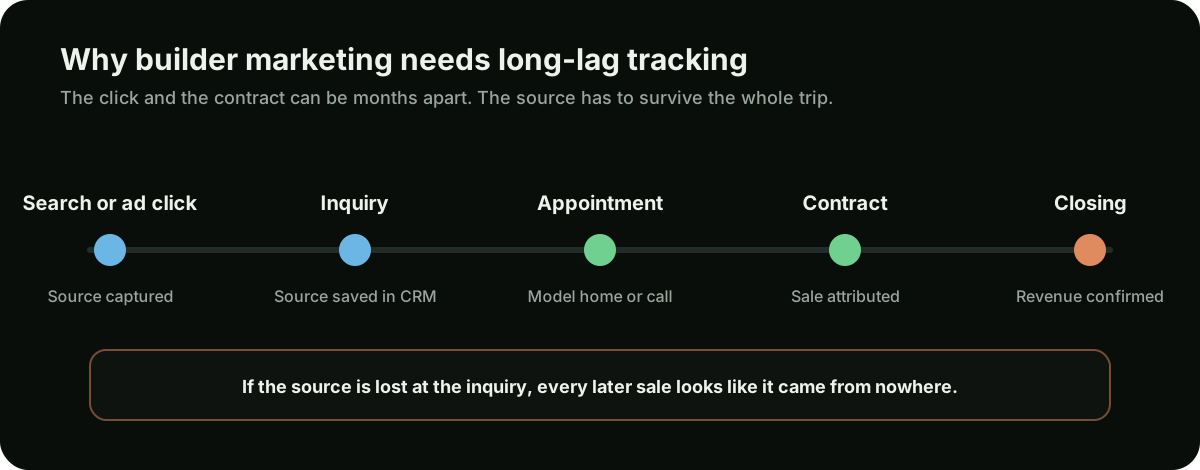
Home builders have one of the longest gaps between click and revenue of any business that advertises online. A buyer may inquire in one season, tour weeks later, sign a contract after that, and close when the home is finished. Judging marketing on this month's spend divided by this month's leads ignores almost all of that.
The specific ways it misleads:
- It rewards cheap, unqualified inquiries. A channel that fills your inbox with renters, plan shoppers, and buyers outside your price range will always win on cost per lead and lose on contracts.
- It punishes the channels that produce buyers. A community-name search or a well-built community page may produce fewer inquiries at a higher cost each, but a much larger share become tours and contracts.
- It mismatches timing. Spend in one month produces contracts in later months. Monthly reports show spend without its outcome and outcomes without their spend.
- It hides lost sources. If the lead source is overwritten or never recorded, a contract that started with an ad click is reported as a walk-in or a referral, and the channel that earned it looks like it failed.
The fix is to judge each channel on cost per qualified inquiry, cost per appointment, and cost per contract, measured over a window long enough to include the lag — and to keep the original source attached to the buyer all the way through. That is a tracking problem as much as a reporting one, which is why it comes up again under CRM stages.
Allocating the budget across channels
Once you know the total and the cost-per-inquiry ceiling, the question is where the money goes. There is no universal split. The right mix depends on how much organic visibility your communities already have, how competitive your area searches are, and which channels your own tracking shows producing appointments.
| Line item | What it does | Tradeoffs to weigh |
|---|---|---|
| Website and community pages | Where every other channel sends buyers. Community, plan, quick move-in, and area pages convert or lose the inquiry | Not optional and not a one-off. Weak pages make every paid click more expensive |
| SEO and Google Business Profile | Visibility for community names, area searches, and builder searches without paying per click | Takes months to build and cannot be switched on for a launch, but compounds and keeps working between releases |
| Google Ads | Direct control over community-name, brand, and area searches right now | Fast and flexible, but stops the moment spending stops, and wasteful without negatives and tracking |
| Listing sites and portals | Reach buyers who start their search on a portal rather than on Google | Can produce volume, but you rent the audience, compete on the same page with other builders, and the portal may outrank you for your own community name |
| Realtor co-op | Commission paid to buyer agents who bring a sale | A real cost of selling that many builders manage themselves. Decide whether it sits inside or outside the marketing budget and track agent-sourced sales consistently |
| Events, signage, and site marketing | Grand openings, model home events, on-site signage | Hard to attribute unless inquiries and visits are captured with a source |
Community pages and SEO are the base layer. Buyers who hear about a community from a sign, an agent, or a portal still search its name, and your own page should be what they find. See local SEO for home builders for the structure, and websites for home builders for what those pages need to convert.
Google Ads covers three kinds of search with different budget logic: community-name searches (highest intent, often worth defending when a portal outranks you), brand searches (small and defensive), and area searches like new homes in a named town (larger, more competitive, and most in need of tight negatives). How to structure those campaigns is covered in Google Ads for home builders.
Portals and listing sites deserve an honest look at your own data. Some builders find they produce qualified buyers; others find they produce volume that rarely tours. Keep them only if the tracked cost per appointment or contract justifies them, and make sure your own community page competes for the same searches so you are not paying to reach buyers who were already looking for you.
Grand openings versus close-outs
A flat monthly budget per community ignores the fact that communities have life stages, and each needs a different level and kind of spend.
- Pre-launch and grand opening. The community has no organic history, no reviews tied to it, and no search demand for its name yet. Spend is front-loaded: community page and interest list live well before opening, paid search on area terms and the community name as soon as it is announced, and event promotion. Budget per home sold is highest here, and that is expected.
- Selling phase. Demand for the community name builds, organic visibility improves, and word of mouth starts. Spend can shift from awareness toward capturing name and area searches efficiently. This is where the per-home budget usually settles.
- Release pushes. New phases or price releases justify short, deliberate increases tied to the specific inventory being released.
- Quick move-in and standing inventory. Finished homes carry real carrying cost. Targeted spend on move-in-ready searches can be worth more per home than the community average.
- Close-out. With few homes left, spend should fall sharply and focus on the remaining inventory. Continuing a full budget on a nearly sold community is one of the most common forms of waste — and the money is often better moved to the next community's launch.
Planning by phase means the annual budget is really a set of community budgets that rise and fall on different schedules. The per-home method handles this naturally: a launching community gets a higher budget per home than a close-out.
Production versus custom builders
The method is the same for every builder — work back from homes to sell — but the inputs and the allocation look very different.
| Production and semi-custom builders | Custom builders | |
|---|---|---|
| Unit of planning | Community and release | Individual build, often on the buyer's land |
| Volume | More homes, more inquiries needed | Far fewer homes; a handful of qualified conversations can make a year |
| What a qualified inquiry looks like | Right community, price range, and timeframe | Right budget, land situation, design expectations, and timeline |
| Where the budget tends to go | Community pages, community-name and area search, quick move-in promotion | Website and portfolio, search presence for custom and luxury terms, referral and designer relationships |
| Biggest risk | Spreading budget thin across too many communities | Paying for volume that does not match the budget or land situation |
Custom builders in particular should resist being judged on inquiry volume. A campaign producing many inquiries from buyers with budgets far below your minimum is worse than one producing a few from buyers who can actually build with you. The positioning and qualification side of that is covered in custom home builder marketing.
Tracking spend through CRM stages
A budget that ties to closings needs tracking that ties to closings. For most builders, that means the CRM, not the ad platform, is the source of truth.
- Capture the source at the first touch. Every web form, call, and chat should record where the buyer came from — channel, campaign, and community — and pass it into the CRM automatically, not by asking the buyer weeks later.
- Never overwrite the original source. Buyers come back through several channels. Keep the first source and, if your CRM allows, the most recent one too.
- Define the stages consistently. Inquiry, qualified inquiry, appointment or tour, contract, cancellation, closing. Every salesperson should move buyers through the same stages the same way, or the funnel numbers mean nothing.
- Record why leads stall. Wrong price range, wrong area, not ready, financing, chose another builder. These reasons tell you which channels are sending the wrong buyers.
- Feed later stages back to the ad platforms as offline conversions where possible, so paid campaigns can be judged — and eventually optimised — on appointments and contracts rather than raw form fills.
With that in place, the budget worksheet stops being a forecast and becomes a scorecard: actual cost per qualified inquiry, per appointment, and per contract, by channel and by community.
Reviewing the budget each quarter
Because of the lag, monthly reviews should focus on leading indicators and quarterly reviews on the full picture.
- Monthly: qualified inquiries and appointments by channel and community, speed of first response, search terms and negatives in paid campaigns, and whether any community is running short of inquiries for its sales plan.
- Quarterly: cost per appointment and cost per contract by channel, updated conversion rates for the worksheet, cancellations, and whether each community's phase has changed enough to move its budget.
- Annually: actual marketing spend per home closed against the plan, by community, and a fresh look at the acquisition share you are willing to spend given this year's margins.
When a channel's cost per contract is below your ceiling and the community still needs sales, give it more. When a channel produces inquiries that consistently fail to become appointments, cut it or fix it, regardless of how cheap its leads look. When a community is nearly sold, move the money on.
Common builder budgeting mistakes
- Setting the budget from last year's number. It ignores which communities are launching, selling, or closing out.
- Borrowing an industry percentage. Someone else's margin, price point, and market are not yours.
- Judging channels on monthly cost per lead. The cheapest leads are rarely the ones that tour and contract.
- Losing the lead source in the CRM. Every contract with no source makes the channel that earned it look like it failed.
- Spreading budget evenly across communities. Launches need more per home; close-outs need far less.
- Funding paid traffic before community pages can convert it. Every weak page raises the cost of every click.
- Letting portals own your community names. Paying a portal to reach buyers who were searching for you by name.
- Ignoring follow-up speed. Slow response lowers inquiry-to-appointment rate, which quietly raises the budget every home needs.
- Treating co-op inconsistently. Wherever it sits, count it the same way every year so cost per sale is comparable.
For the channels themselves and how buyers search for new homes, see the home builder marketing guide.