
What local SEO for home builders is
Local SEO for home builders is the work of making your communities, floor plans, available homes, model homes, and the areas you build in show up when buyers search nearby — in Google Maps through a Google Business Profile, and in organic results through individual, crawlable pages with real content. Home builder local SEO differs from ordinary local SEO because the pages that earn the most qualified traffic are attached to inventory that eventually sells, so the structure has to be maintained as communities open and close.
Three things follow from that definition, and they set the agenda for the rest of this guide. Your page structure has to mirror the way buyers shop, which is by community and by plan. Your site has to survive weekly inventory change without breaking URLs or generating duplicates. And your maintenance process matters as much as your content, because a builder site left alone for a year fills up with sold homes, closed communities, and dead links.
Why builder sites are structurally different
Most local service businesses have a stable set of pages: services, areas, about, contact. A builder site has all of those plus an inventory layer that changes constantly, and that layer is where the commercial value concentrates.
- Geographically fixed products. A community exists at one address. Nothing you do can make it relevant to a buyer forty miles away, so every community page has a natural and quite narrow audience.
- Finite inventory with an end date. Communities sell out. The page that ranks best today may describe something you cannot sell in eight months.
- High-value, low-frequency purchases. Search volume per community is modest; the value per inquiry is enormous. This justifies work that would never make sense for a higher-volume, lower-value business.
- Third parties ranking for your names. Listing portals syndicate your communities and frequently outrank you for them.
- Platform-generated URLs. Builder website platforms tend to produce filtered inventory URLs in large numbers, which creates crawl and duplication problems nobody intended.
Competing with portals for your own communities
You will rarely beat a major portal for a broad term like new homes in [city], and you should not spend your SEO budget trying. You can and should beat them for your own community names, your plan names, and your brand — because on those searches you have something they do not: complete, current, first-party information. The portal has a syndicated summary. You have every plan, every available home, real photography, current pricing, and the ability to answer a question.
What actually wins those searches:
- Depth the portal cannot match. Site plan, available lots, HOA details, school assignments, amenity status, construction timelines, and the specific homes available now.
- Currency. Portal data lags. A page that is visibly current, with a real last-updated signal and accurate availability, earns both the click and the returning visit.
- Consistent naming. Use one exact community name everywhere — site, profile, listings, signage, syndication feeds. Builders who use three variants split their own signals.
- Internal links from strength. Link to community pages from the homepage, the community finder, area pages, and relevant plan pages, with the community name as anchor text.
- Accepting the paid backstop. For community names where a portal holds the top organic position, a small branded paid search campaign is the pragmatic answer. That is covered in the Google Ads guide.
Syndication is worth a deliberate decision rather than a default. Portals do produce inquiries, and for a new community with no organic footprint they produce them immediately. The cost is that you are helping a competitor rank for your own name. Most builders should syndicate and simultaneously build the community page well enough to win the comparison.
The page architecture that ranks
Almost every builder SEO problem we encounter is an architecture problem wearing a content problem's clothes. The structure below is the one that consistently works.
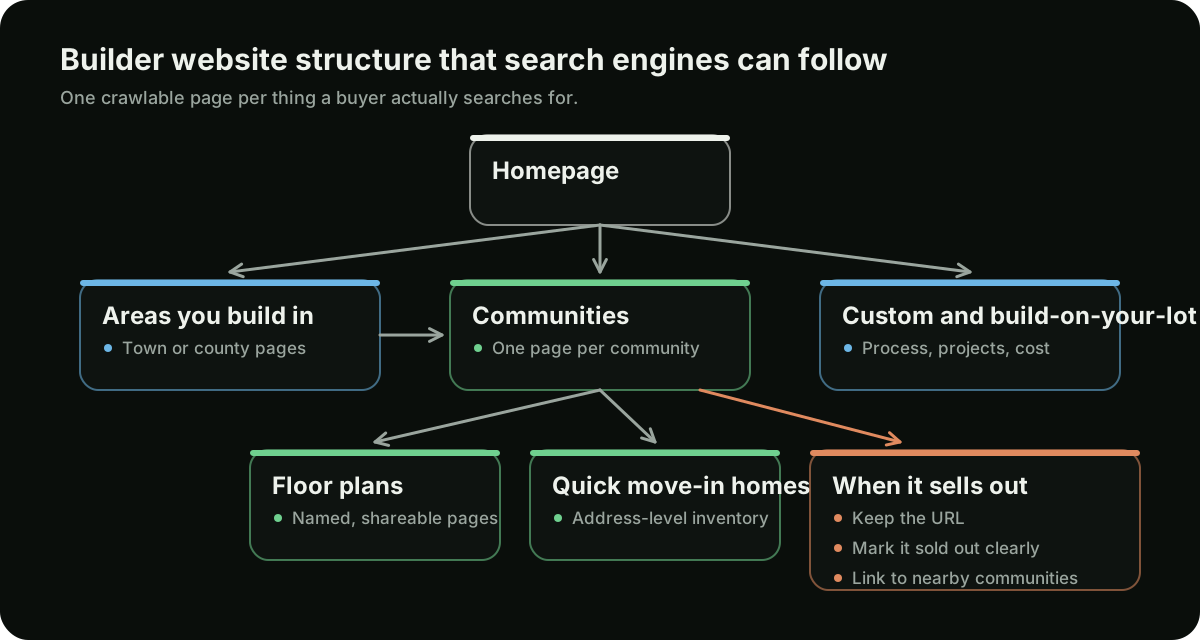
| Level | Pages | Primary intent |
|---|---|---|
| Homepage | One | Brand, and who you build for |
| Area / region | One per market you genuinely build in | new homes in [area], home builders [area] |
| Community | One per community, active and sold out | Community name, new homes [neighborhood] |
| Floor plan | One per plan | Plan name, 4 bedroom new construction [area] |
| Available home | One per quick move-in home | Address, move in ready homes [area] |
| Process / service | Build on your lot, design-build, financing, warranty | Research and qualification |
| Guides | Buying new construction, cost, timelines, comparisons | Top-of-funnel research |
Two rules make the difference. Every level must be reachable by a crawler following plain links from the homepage — not only through a map, a filter widget, or a search box. And every page must be worth the click on its own; if a plan page would contain nothing but a rendering and a bedroom count, it is not ready to be a page yet.
Community pages
This is the most important page type on a production builder's site. It is where high-intent search lands and where inquiries are won or lost.
What belongs on it:
- Name, location, and status in the first screen. Community name, city, and whether it is now selling, coming soon, final homes, or sold out. Buyers scan for status first.
- Price range and home specifications. A from-price and the range of sizes and bedroom counts. Omitting price costs you the buyers who would have qualified and keeps the ones who will not.
- Available homes and plans, linked. Both lists, with real links to individual pages rather than an in-page accordion.
- Site plan and lot availability. Heavily used by serious buyers, and content no portal reproduces well.
- Location specifics. School assignments, commute context, nearby retail, amenity status and timing. This is what makes the page genuinely local rather than templated.
- Real photography. Construction progress, completed homes, the model, the neighbourhood. Renderings should be labelled as renderings.
- Sales office details. Address, hours, and how to book an appointment.
- One clear next step, ideally scheduling a visit, with the community carried through the form.
On titles: [Community Name] | New Homes in [City] | [Builder] works because it matches how buyers search and stays readable. The common mistake is a title that is only the community name, which throws away the area term, or a title stuffed with three cities the community is not in.
Floor plan pages
Plan pages rank for two things: the plan name, which buyers search after a model visit or a portal browse, and specification queries such as 4 bedroom 3 bath new construction [area].
What makes them rank and convert:
- Complete specifications in HTML text. Square footage, bedrooms, bathrooms, garage, stories, and included features — as readable text, not baked into an image of the plan.
- The floor plan image with a genuine alt attribute describing the plan and its layout.
- Which communities offer it, linked. Both a useful cross-link for buyers and a strong internal linking signal.
- Options and elevations. The structural choices and exterior styles available, which is exactly what a buyer comparing two plans wants.
- Any built examples. Photography of the plan as constructed, and available homes using it.
- A from-price with its conditions. Ranges vary by community and lot premium; say so rather than leaving it blank.
Plans offered in several communities create a real duplication risk. Resolve it by keeping one canonical plan page and linking to it from each community, rather than publishing a near-identical plan page per community. If community-specific plan pages are genuinely needed — different pricing, different options — they must carry that differentiating content, and the community context belongs in the title.
Quick move-in and inventory pages
Available homes are the highest-intent inventory a builder has, and they are searched by address, by move in ready homes near me, and by specification. They are also the hardest page type to manage, because each one exists for a matter of weeks.
A workable approach:
- Give each home a stable URL based on the address or a persistent home ID, not on a session or filter parameter.
- Put the facts in text. Address, price, specifications, completion date, and included features. Say clearly whether the home is complete, under construction, or planned.
- Link it from the community page and the plan page it is built from.
- Decide the sold-home policy up front. The cleanest pattern is to keep the page for a short period marked sold, with prominent links to similar available homes, then 301 it to its community page. What you must not do is leave a live page implying a sold home is available, or delete it into a 404.
- Keep a listing page for inventory that ranks — quick move-in homes [area] — and treat it as a permanent page whose contents rotate, not something regenerated at a new URL.
If a home's completion date or price changes, change it on the page the same week. Builder sites lose more trust to stale inventory than to any ranking factor; a buyer who drives to a home that sold a month ago does not come back to the website.
What to do when a community sells out
Keep the URL and convert the page. A sold-out community page typically holds the strongest ranking signals on a builder's site — it has aged, earned links, and accumulated searches for a name people in the area keep using. Deleting it discards that equity and hands the search to a portal. The right move is to change the page's job: mark it sold out honestly, preserve the photography and specifications, and route the traffic to what you are selling now.
The protocol we use:
- Update status prominently at the top of the page. No ambiguity, and no inquiry form implying availability.
- Keep the substance. Location details, the plans that were built, completed-home photography, and what the community turned out to be. This is genuinely useful to anyone researching the neighbourhood.
- Add a clear onward path. The nearest active communities, and the plans that were offered here and are still available elsewhere. This is where the page earns its keep.
- Keep it indexable and in the sitemap, with the status change reflected in the title and meta description.
- Only redirect when there is a genuine successor — a phase two, or a rename. Then use a single permanent redirect to the successor page and never chain it through an intermediate URL.
- Remove it from the active community finder while keeping it linked from an archive or past-communities list, so it stays reachable and keeps its internal links.
The same logic applies to a community that is renamed or rephased: redirect once, to the closest equivalent, and update the internal links pointing at the old URL rather than relying on the redirect to carry them.
Service-area pages without the spam
Area pages are legitimate and useful when they are real. The failure mode is templating a page per town with the name swapped, which is a doorway pattern and carries genuine risk.
The line is straightforward: a town gets a page when you have something true and specific to say about building there. That usually means communities in or near it, completed homes, knowledge of local lot supply and permitting, and price context.
- Write at the level your inventory supports. One strong page about a metro area beats eleven thin suburb pages.
- Link to the actual communities serving that area. This is the page's main job and its main ranking asset.
- Include real local detail. School districts, typical lot sizes, commute patterns, what is being developed. If you cannot write this without research you are unwilling to do, skip the page.
- Do not claim a location you do not have. No fabricated addresses, no offices in towns where you have none. A service-area page states where you build; it does not pretend to be a branch.
- Prune as you go. If an area page has no communities left and nothing specific to say, fold it into the regional page with a single redirect.
- Connect area pages to your profiles. Where a staffed model home serves an area, reference it on the area page with its address and hours, and link the profile to the community page it belongs to. The page and the profile should describe the same place the same way.
For a sense of how we think about markets, see the markets we focus on — the same rule applies there: a page earns its place by saying something specific.
Google Business Profile and model homes
Builders have a genuine, and genuinely misunderstood, opportunity here: a staffed model home or sales office with regular public hours is an eligible location. An unstaffed lot is not. For most builders, the profile is what shows in the map results when a buyer searches new homes near me or home builders [city], so it is often the first thing they see before they ever reach the website.
How eligibility works in practice:
- Eligible: a model home or sales center with a real address, signage, and a person on site during the hours listed on the profile. A design studio or main office that buyers can visit during stated hours also qualifies.
- Not eligible: a lot or phase with nobody on site, a community that is only a map pin, or a P.O. box or virtual office.
- When in doubt, read Google's current Business Profile guidelines before creating the listing. Getting this wrong can put profiles that do qualify at risk alongside the ones that do not.
Once a location qualifies:
- Create profiles only for staffed locations with real hours. A profile for every community you sell in is the kind of shortcut that gets a builder's whole profile portfolio suspended.
- Use the accurate primary category — home builder, custom home builder — and add relevant secondaries rather than reaching for unrelated ones.
- Name the profile as the business is named. Keyword-stuffed names risk the asset that produces the most local visibility you have.
- Point each profile at the right page. A model home profile should link to its community page, not the homepage.
- Add real photography regularly. Completed homes, the model, construction progress, the sales office.
- Ask closed buyers for reviews, without incentives. Builders under-collect reviews badly relative to how much weight buyers give them.
- Update hours around holidays and sellouts. When a model closes, close or move the profile rather than leaving a listing that sends buyers to an empty building.
Our general approach to profile work is on the Google Business Profile page.
Reviews, citations, and NAP consistency
Map visibility depends on more than the profile itself. Google also looks at whether your business information is consistent across the web and whether real buyers say good things about you.
- Keep name, address, and phone (NAP) identical everywhere. Your website, each profile, your listings on portals, and directory entries should use the same business name, the same address format, and the same phone number for each location. Tracking numbers belong on the website and in ads, with the main number kept as the listed number on profiles and citations.
- Claim the citations that matter for builders. Your local and state home builders association member directory, the Better Business Bureau, the chamber of commerce, and the major general directories. A small number of accurate, relevant listings is more useful than a large number of inconsistent ones.
- Clean up old records. Former sales office addresses, closed model homes, and old phone numbers tend to linger in directories for years. Correct or close them so they do not contradict your current profiles.
- Ask buyers for reviews at natural moments. After closing and again after the first warranty walkthrough are the obvious points. Ask everyone, not only the happiest buyers, and never offer incentives in exchange for reviews.
- Send reviews to the right profile. A buyer from a specific community should be asked to review the model home or sales office they actually dealt with.
- Reply to reviews, including the critical ones. A calm, specific reply to a warranty complaint reads well to the next buyer.
None of this is complicated, but it is easy to let slip. It is usually cheaper to fix than anything else in this guide and it supports every profile you have.
Technical foundations
Builder sites are image-heavy, platform-driven, and frequently rebuilt. That combination produces a predictable set of technical problems.
- Server-rendered content. If community, plan, or inventory content only appears after JavaScript runs, treat it as at risk. Test with JavaScript disabled and confirm the important text and links are in the initial HTML.
- Image performance. Modern formats, explicit width and height on every image to prevent layout shift, lazy loading below the fold, and eager loading for the hero. Builder galleries are the most common cause of slow builder sites.
- Correct canonicals. Self-referencing on real pages; pointing to the canonical version wherever filters or parameters produce variants.
- A maintained XML sitemap that reflects inventory changes and contains only indexable, canonical URLs — no redirects, no 404s, no noindex pages.
- No accidental blocking. Check
robots.txtand page-level robots directives after every platform change; a stagingnoindexsurviving a launch is the most expensive mistake in this list. - Clean redirects after a rebuild. Every old community, plan, and inventory URL mapped once to its closest equivalent. One hop, no chains.
- Mobile as the primary experience. Most buyers browse on a phone, often while parked in the community.
Crawl traps in builder platforms
The most common technical failure on builder websites is a faceted inventory search that generates a unique URL for every combination of filters. Bedrooms, baths, price band, square footage, community, and status can multiply into thousands of near-identical crawlable pages, which dilutes crawling, creates duplication, and buries the pages you actually want ranked.
How to contain it:
- Pick the filter combinations worth indexing — usually community, and perhaps status — and give those static, linked URLs with real titles.
- Canonicalise the rest to the unfiltered listing page, or keep them out of the crawl path entirely by generating them behind a form or a fragment.
- Never link to parameterised variants in your own navigation. Internal links are how most of these get discovered.
- Handle pagination honestly. Crawlable page links, self-referencing canonicals per page, and no infinite scroll without a paginated fallback.
- Watch the community finder. A map-only finder is usually invisible to crawlers; keep a plain linked list of communities somewhere, even if the map is the primary interface.
- Check sorting parameters. Sort order variants are pure duplication and should be canonicalised away.
Structured data for builders
Useful, but only where it describes what is visibly on the page. The types worth implementing:
- Organization once, sitewide, with the real name, logo, address, and profiles.
- BreadcrumbList on every page below the homepage, matching the visible breadcrumb.
- Service on your process and service pages, describing what you actually offer.
- Article on genuine guides, with accurate publication and modification dates.
- FAQPage only where eligible under current guidance and where the questions are genuinely on the page — not as a tactic on every template.
Two prohibitions worth stating plainly. Do not add review or aggregate rating markup unless legitimate qualifying reviews exist on the page and the implementation meets Google's requirements. And do not mark up prices or availability that the page does not display, or that are not current — inaccurate markup on inventory is both a guideline problem and a trust problem with buyers.
Internal linking
Builder sites tend to have strong homepages and orphaned inventory. Internal linking is how authority reaches the pages that convert.
- Homepage to area pages, area pages to communities. The main path, and it should be plain links.
- Communities to their plans and available homes, and each plan back to the communities offering it.
- Sold-out communities to nearby active ones. This is how preserved equity gets put to work.
- Guides to commercial pages. A guide about choosing a floor plan should link to your plans; a new-construction buying guide should link to your communities.
- Descriptive anchors. The community name, the plan name, the area. Not “learn more”, and not the same exact-match phrase repeated forty times.
- Depth discipline. Every community and plan should be within two or three clicks of the homepage.
Content that earns links and trust
Builders do not need a weekly blog. They need a small number of pages that answer the questions buyers genuinely research, written with knowledge a national content site cannot fake.
- The buying process, start to finish. Contract, selections, construction phases, walkthroughs, closing, warranty. Most buyers have never done this.
- Building versus buying existing, in your market. Honest, local, and useful.
- What drives cost and what options are worth. Structural versus cosmetic, what to do now versus later.
- Timelines with local context. Permitting realities and current conditions in your area.
- Financing for new construction. Builder incentives, rate buydowns, construction loans, and how they differ from resale financing.
- Area and community guides for the places you build — genuinely researched, not spun.
Links follow from real things: being the builder in a named development, working with local architects and designers who credit you, local press about a project, and community involvement. Nothing purchased.
Tracking organic inquiries
Builder SEO is usually judged badly because the measurement stops at the form fill, months before the contract.
- Track the inquiry types separately: appointment requests, community-specific inquiries, plan inquiries, and general contact. They have very different values.
- Carry the source and the community into the CRM. A lead record without community and channel cannot be evaluated later.
- Import outcomes back. Appointments held, qualified opportunities, and contracts, attributed to the original source, is what makes the channel defensible.
- Extend the attribution window to the longest your tools allow. Default windows are far shorter than a new-home decision.
- Track calls with dynamic numbers where possible, since a large share of builder inquiries are phone calls to the sales office.
- Report by community. Aggregate organic traffic hides the only thing worth knowing: which communities are generating qualified interest and which are not.
Tracking by community is also what makes spending decisions possible. Our guide to setting a home builder marketing budget covers how to split money between SEO, paid search, and the website once you can see which communities are producing appointments. The inquiry side of the same structure — forms, calls, and page layout — is covered in our guide to websites for home builders.
How long builder SEO takes
Honestly, with no promises attached:
| Work | Typical time to see movement |
|---|---|
| Fixing technical blocking or crawl issues | Weeks, once recrawled |
| Improving existing community and plan pages | One to three months |
| Ranking a brand-new community for its own name | Weeks to a couple of months |
| Winning a community name held by a portal | Two to six months |
| Competitive area terms (new homes in [city]) | Six to twelve months, sometimes longer |
| Recovering from a rebuild that lost redirects | Months, and not always fully |
The variable nobody controls is competition. In a market with three active builders and weak websites, this moves fast. In a large metro with national builders and entrenched portals, area-level terms are a long campaign and community-level terms are where the early wins are.
Common home builder local SEO mistakes
- Deleting sold-out community pages. The most expensive habit in builder SEO, and the easiest to stop.
- A JavaScript-only community finder. Buyers can use it; crawlers often cannot, which orphans the site's best pages.
- No individual community pages. Forfeits the highest-intent searches a builder has.
- Mass-produced city pages. A doorway pattern with real risk and no upside.
- Rebuilding the site without a redirect map. Years of community and plan equity lost in an afternoon.
- Stale inventory. Sold homes still listed, closed communities still shown as selling; costs trust and inquiries.
- Faceted inventory filters left open to crawling. Thousands of near-duplicate URLs burying the real ones.
- Prices hidden everywhere. Filters out the qualified buyers and keeps the unqualified ones.
- Profiles for unstaffed communities. Risks suspension of the profiles that do work.
- Inconsistent business details. Old addresses and phone numbers left in directories contradict the profiles you are trying to rank.
- Renderings presented as photography. Buyers notice at the model, and the trust does not come back.
- Measuring only sessions. The channel gets cut because nobody connected it to appointments.